Elevate Your Visuals with Ink Brush Stroke for Photo Overlay
In the crowded digital landscape, static images often fail to capture attention. Whether you are scrolling through social media feeds or browsing an online store, the eye is drawn to texture, movement, and contrast. This is where the Ink Brush Stroke for Photo Overlay becomes an indispensable tool for modern creators. It is not just about adding a black smear to a picture; it is about introducing organic energy into digital compositions. By integrating abstract ink elements, you transform flat photographs into dynamic visual stories that resonate with viewers on a deeper, more artistic level.
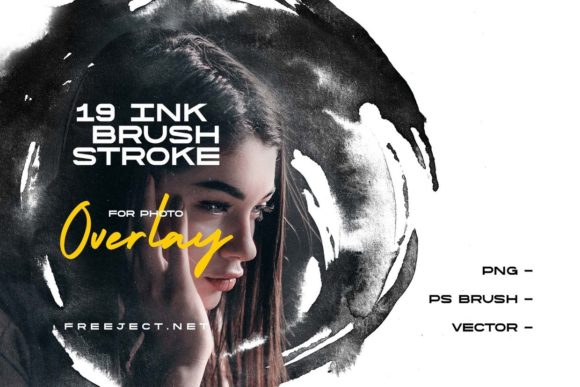
We have developed a unique collection of ink strokes specifically designed for photo overlays. Unlike generic clipart, these assets are crafted with the nuances of real brushwork in mind, offering the imperfection and fluidity that digital tools often lack. The package includes 19 high-quality PNG files with transparent backgrounds, 19 vector files in EPS 10 format, and 19 Photoshop brushes. This versatility ensures that whether you are a quick-editing blogger or a detailed-oriented graphic designer, you have the right format for your workflow.
Why Organic Texture Matters in Digital Design
Digital photography and design can sometimes feel sterile. Perfect lighting, sharp edges, and uniform colors are great for clarity, but they rarely evoke emotion. Human beings are naturally drawn to organic patterns. The irregular flow of ink, the subtle splatters, and the varying opacity of a brush stroke mimic natural phenomena. When you apply an Ink Brush Stroke for Photo Overlay, you break the rigid grid of pixel-perfect design. You introduce chaos in a controlled way, which makes the image feel alive.
Consider the difference between a standard headshot and one enhanced with a subtle ink splash across the corner. The latter suggests creativity, boldness, and individuality. For marketers and entrepreneurs, this distinction is crucial. It helps brands stand out in a sea of stock photography that looks identical. Using these overlays allows you to inject personality into your visuals without needing to hire a painter or spend hours manipulating complex layer masks manually.
Practical Use Cases for Creators and Businesses
The application of ink strokes is limited only by your imagination, but several key scenarios highlight their effectiveness. Understanding where and when to use these assets can significantly enhance your output.
Social Media Content and Personal Branding
For influencers, coaches, and freelancers, consistency is key, but monotony is the enemy. Using ink overlays can create a signature look for your Instagram posts or LinkedIn banners. Imagine a quote graphic where the text is framed by sweeping black ink strokes. This draws the eye directly to the message while adding an artistic flair that encourages users to stop scrolling. The PNG files with transparent backgrounds make this process instantaneous. You simply drag, drop, and adjust the opacity to suit your brand colors.
Editorial and Blog Design
Bloggers and online publishers often struggle to make featured images engaging. A standard photo of a laptop or a coffee cup is functional but boring. By overlaying an abstract ink stroke, you add depth and context. For example, a post about "creative block" could feature an image of a blank page with a dramatic ink splash breaking through the whitespace. This visual metaphor reinforces the article’s topic before the reader even begins the text. The vector EPS 10 files are particularly useful here, as they allow you to scale the graphics to any size without losing quality, ensuring crisp visuals on both mobile devices and high-resolution desktop screens.
Product Photography and E-Commerce
Small business owners selling handmade goods, jewelry, or art prints can benefit immensely from these overlays. Product photos often look flat against white backgrounds. Adding a subtle ink texture behind or around the product can ground the item and give it a premium, artisanal feel. It suggests that the product is crafted with care, aligning with the aesthetic of handmade or luxury items. The Photoshop brushes included in the pack allow for even more customization, letting you paint additional details directly onto your product images for a truly unique presentation.
Choosing the Right Format for Your Workflow
One of the most significant advantages of this collection is the variety of file formats provided. Each format serves a specific purpose, and knowing which one to use can save you time and improve your final result.
- PNG Files: These are ideal for quick edits and users who do not use professional design software. Since they come with transparent backgrounds, you can drop them into Canva, PowerPoint, or basic photo editors immediately. They are perfect for social media graphics, presentations, and web banners.
- Vector EPS 10 Files: If you are working in Adobe Illustrator or need to print your designs at large sizes, vectors are essential. They allow you to resize the ink strokes infinitely without pixelation. You can also recolor them easily to match specific brand guidelines, something that is harder to do with raster images.
- Photoshop Brushes: For designers who want total control, the brush files are invaluable. Instead of placing a pre-made shape, you can paint the ink strokes yourself. This allows you to adjust the pressure, angle, and flow in real-time, creating custom compositions that fit perfectly around your subject matter.
Considerations Before You Download
While using an Ink Brush Stroke for Photo Overlay is straightforward, there are a few practical considerations to keep in mind to ensure professional results. First, consider the mood of your image. Ink strokes are bold and dramatic. They work best with high-contrast images or minimalist designs. Applying a heavy ink overlay to a already busy or cluttered photo can make the final image look chaotic and unreadable. Less is often more; try lowering the opacity of the overlay to let the underlying photo breathe.
Second, think about color harmony. While black ink is classic and versatile, don’t be afraid to experiment with color if you are using the vector or brush formats. However, ensure that the color of the ink complements rather than clashes with the dominant tones in your photograph. A dark blue ink might work beautifully with a seascape, while a deep red could enhance a portrait with warm skin tones.
Finally, respect the resolution. Even though vectors are scalable, the PNGs and brushes have fixed resolutions. Ensure that the asset you choose is large enough for your intended output. If you are designing for a large print poster, use the EPS vectors. For web use, the PNGs are typically sufficient and load faster.
Enhancing Your Creative Toolkit
Investing in quality design assets like these ink strokes is an investment in your efficiency and creative potential. Instead of spending hours trying to create realistic ink effects from scratch, you have a library of professional-grade elements at your fingertips. This allows you to focus on the bigger picture: storytelling, messaging, and connection.
Whether you are a educator creating engaging slide decks, a marketer designing ad campaigns, or a hobbyist documenting your travels, these tools provide the polish that separates amateur efforts from professional work. The ability to quickly add an artistic touch means you can produce more content, faster, without sacrificing quality.
To see how these elements can transform your own projects, we encourage you to explore the possibilities firsthand. Experience the flexibility of having PNGs, vectors, and brushes all in one package. You can download the demo file at the link below to test the quality and versatility of these assets in your own workflow. Discover how a simple ink stroke can become the defining element of your next visual masterpiece.