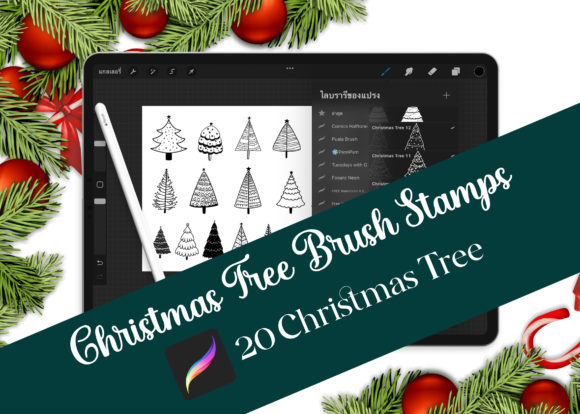
20 Procreate Christmas Tree Brush Stamp
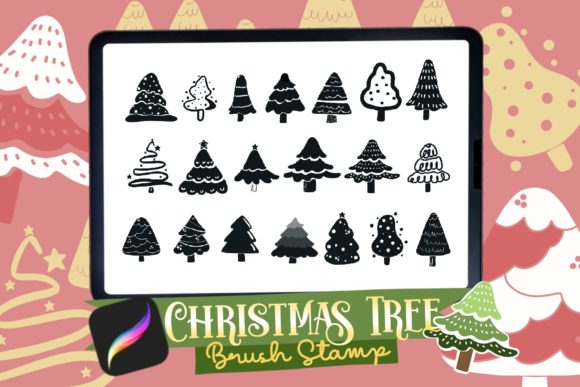
Holiday design season often brings a rush of deadlines and creative demands. Whether you are illustrating greeting cards for clients, designing festive merchandise for your small business, or simply creating digital art for social media, having the right tools can significantly reduce your workload. The 20 Procreate Christmas Tree Brush Stamp set offers a streamlined solution for artists who want to add high-quality, ornamental tree elements to their projects without drawing each one from scratch. This collection is designed specifically for use in Procreate on the iPad, providing a versatile mix of brush stamps and standalone image files that adapt to various creative workflows.
What Is Included in the Set?
Understanding the file structure is the first step to maximizing the value of this asset pack. When you download the ZIP file, you receive three distinct types of files, each serving a different purpose in your design process:
- 1 Christmas_Tree.brush file: This is the core component for Procreate users. It installs directly into your brush library, allowing you to stamp trees with a single tap or swipe. The brush is optimized for pressure sensitivity and responsiveness, ensuring a smooth experience on your iPad.
- 20 SVG Files: Scalable Vector Graphics are essential for professional print work. Unlike pixel-based images, SVGs can be resized to any dimension without losing quality. These are ideal for large-format prints like banners, posters, or vinyl cuts for T-shirts.
- 20 PNG Files: These are raster images with transparent backgrounds. They are perfect for quick compositing in Procreate, Photoshop, or Canva. You can drag and drop them directly onto your canvas to layer with other elements.
This multi-format approach ensures that whether you are a digital illustrator, a print-on-demand entrepreneur, or a hobbyist making stickers, you have the correct file type for your specific needs.
Streamlining Your Holiday Design Workflow
The primary appeal of the 20 Christmas Tree Brush Stamp Set lies in its efficiency. Drawing intricate, ornamental trees by hand is time-consuming. While sketching is a vital skill, repetitive tasks can lead to fatigue and inconsistent results. By using pre-designed stamps, you maintain visual consistency across a project while freeing up mental energy for composition, color theory, and lighting.
For beginners, this tool lowers the barrier to entry. You do not need advanced perspective skills to create a balanced holiday scene. You can focus on arranging elements and experimenting with colors. For professionals, it acts as a rapid prototyping tool. You can quickly mock up concepts for client approval before committing to detailed custom illustrations.
Versatile Applications for Creators and Businesses
The versatility of these assets extends far beyond simple digital drawings. Because the set includes both vector and raster formats, it supports a wide range of commercial and personal applications.
Print-on-Demand and Merchandise
If you run an online store selling holiday goods, these designs are ready for production. The SVG files are particularly valuable here. You can import them into software used for cutting machines to create heat-transfer vinyl for T-shirts, tote bags, or hoodies. The clean lines of the ornamental stamps ensure that the cut paths are smooth, resulting in professional-quality apparel. Additionally, the PNG files work well for direct-to-garment printing or sublimation on mugs and pillows.
Greeting Cards and Stationery
Creating a cohesive series of greeting cards is easier when you have a unified set of elements. You can combine different tree stamps from the set to create unique compositions for each card. Layering a simple tree stamp with hand-lettered messages or additional decorative brushes creates a personalized touch. The transparent background of the PNGs allows you to place the trees over textured paper backgrounds or watercolor washes without awkward white boxes around the edges.
Digital Stickers and Planners
Digital planning has become a popular hobby and niche market. The PNG files are perfectly suited for creating digital sticker sheets for apps like GoodNotes or Notability. Users can resize and rotate the tree stamps to decorate their digital planners during the December months. If you sell these sticker packs, the variety of 20 different designs offers enough diversity to keep your customers engaged throughout the season.
Social Media Content
Marketers and bloggers need fresh visuals daily. These stamps can be used to create festive Instagram stories, Pinterest pins, or blog headers. By combining the tree stamps with seasonal color palettes and typography, you can produce branded holiday content quickly. This is especially useful for small business owners who manage their own social media presence and need to maintain a consistent aesthetic without hiring a graphic designer for every post.
How to Use the Brush in Procreate
Installing and using the brush is straightforward, even for those new to the platform. After downloading the ZIP file, extract the contents to your iPad. Tap the Christmas_Tree.brush file, and select "Import to Procreate." The brush will appear in your imported brush set.
To use it, select the brush and tap anywhere on the canvas to stamp a tree. You can adjust the size using the two-finger pinch gesture. For more dynamic compositions, try varying the opacity or blending modes. Multiplying the tree layer over a colored background can create interesting shadow effects, while using "Add" or "Screen" can give the trees a glowing, ethereal look. Experimenting with these settings helps you customize the standard stamps to fit your unique artistic style.
Important Considerations Before Purchasing
While this set offers significant convenience, it is important to understand how to integrate it effectively into your workflow. First, consider the style compatibility. Ornamental stamps have a specific aesthetic—often detailed and decorative. Ensure this style aligns with your brand or project requirements. If your usual style is minimalist or abstract, you may need to modify the stamps or use them sparingly as accent pieces rather than focal points.
Second, review the licensing terms. Most digital asset creators allow for commercial use, but there may be restrictions on reselling the files themselves. You can use the stamps to create end products like cards or shirts, but you cannot redistribute the PNG or SVG files as your own clipart pack. Always read the included license agreement to protect your business.
Finally, think about customization. While the stamps are ready to use, adding your own touches makes them unique. Change the colors to match non-traditional holiday palettes, such as pastels or monochrome schemes. Add texture overlays or hand-drawn details to make the stamped elements feel more organic and less digital. This hybrid approach combines the speed of automation with the warmth of human creativity.
Enhancing Your Creative Toolkit
The 20 Procreate Christmas Tree Brush Stamp set is more than just a collection of images; it is a productivity tool for modern creators. By providing high-quality vectors, transparent PNGs, and a functional Procreate brush, it addresses the diverse needs of today’s digital artists. Whether you are designing a single greeting card for family or launching a full holiday merchandise line, this set provides the foundational elements you need to work faster and smarter. Embracing these tools allows you to focus less on repetitive drawing and more on the creative decisions that truly define your work.