Brush Stamp Christmas Time: A Practical Guide to Holiday Digital Illustration in Procreate
Digital illustration has transformed the way artists approach seasonal design, shifting from labor-intensive hand-drawing to efficient, asset-based workflows. For iPad users working within the Procreate ecosystem, specialized tools like the Brush Stamp Christmas Time set offer a streamlined method for creating festive artwork. However, understanding exactly what this product is—and, perhaps more importantly, what it is not—is crucial for making an informed purchasing decision. This guide explores the functionality, installation, and practical applications of these brush stamps, helping you determine if they align with your creative workflow.
Understanding the Format: Stamps vs. Fonts
A common misconception among new digital artists is confusing brush stamps with font files. It is essential to clarify that Brush Stamp Christmas Time is strictly a brushset file designed for the Procreate application. It is not a font file. This distinction fundamentally changes how you interact with the assets.
Fonts are text-based; you type letters, and the software renders characters. Brush stamps, conversely, are image-based tools. When you tap the screen with a stamp brush, it places a pre-designed graphic—such as a snowflake, ornament, or holiday motif—at that location. This difference offers greater artistic control over placement, rotation, and layering, but it requires a different mindset than typesetting. You are composing a visual scene element by element, rather than typing out a message. For artists who prefer manual composition and unique layouts over standardized text rendering, this format provides superior flexibility.
What Is Included in the Package?
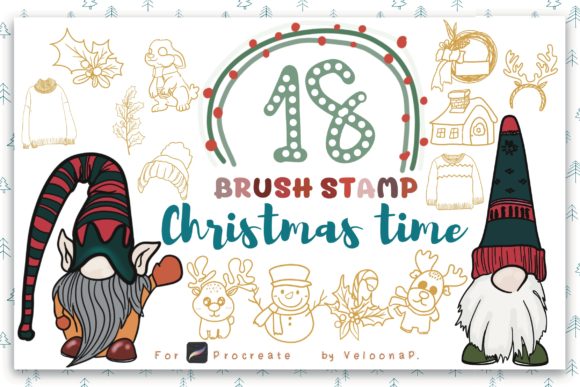
The Brush Stamp Christmas Time collection is designed to be comprehensive yet lightweight. Upon purchase, you receive one zipped file containing 18 VP brush stamp files. The "VP" designation typically refers to the specific configuration or resolution profile optimized for vertical or portrait-oriented canvases, though these can generally be used on any orientation with proper scaling.
In addition to the core brush set, the package includes a valuable bonus: 2 Gnome Christmas PNG files. These standalone images can be imported directly into your canvas as separate layers, offering immediate high-quality assets for composite designs without needing to use the brush tool. This combination of dynamic brushes and static PNGs provides a versatile toolkit for both quick social media graphics and more complex digital illustrations.
Technical Requirements and Compatibility
Before integrating these tools into your workflow, ensure your hardware and software meet the necessary specifications. The primary requirement is an iPad capable of running the Procreate application. Specifically, you must have the latest version of Procreate installed. Older versions may lack support for newer brush engine features or file formats, potentially leading to installation errors or performance issues.
Because these are high-resolution stamps, device performance matters. While modern iPads handle these files effortlessly, older models with limited RAM might experience slight latency when switching between heavy brush sets. However, for most users aged 20–50 who maintain relatively current devices, compatibility should be seamless.
Installation Process: Step-by-Step
One of the advantages of Procreate’s ecosystem is its straightforward import process. Installing Brush Stamp Christmas Time does not require complex technical knowledge. Follow these steps to get started:
- Download and Unzip: After purchasing, download the zipped file to your iPad. Use the Files app to unzip the archive. This will extract the individual .brushset or .brush files.
- Open in Procreate: Locate the extracted files in the Files app. Tap on the brushset file and select “Share” or “Open In.” Choose Procreate from the list of available apps.
- Automatic Installation: Procreate will automatically import the brushes. You do not need to manually drag and drop files into specific folders within the app.
- Accessing the Brushes: Open Procreate and create a new canvas. Tap the brush icon to open the Brush Library. Look for the newly created folder, typically named after the set, where your 18 Christmas stamps will be listed.
This streamlined process ensures that you can begin creating within minutes of download, minimizing friction between acquisition and creation.
Comparing Brush Stamps to Alternative Methods
When evaluating Brush Stamp Christmas Time, it is helpful to compare it against other common methods for adding holiday elements to digital art. Understanding these tradeoffs helps you decide if this tool fits your specific needs.
Brush Stamps vs. Hand-Drawn Elements
Hand-drawing every snowflake, wreath, or gift box offers maximum originality but is time-consuming. Brush stamps provide a significant efficiency boost. They are ideal for designers who need to produce multiple variations of a design quickly, such as for holiday cards or social media content. However, if your goal is to showcase pure illustrative skill or create a completely unique character design, hand-drawing remains the superior choice. Brush stamps are best used as accents or background elements rather than the focal point of a high-end portfolio piece.
Brush Stamps vs. Stock Photo Overlays
Using stock PNGs is another common alternative. While stock photos offer photorealism, they often lack the cohesive stylistic unity of a dedicated brush set. The Brush Stamp Christmas Time set ensures that all elements share a consistent artistic style, color palette, and line weight. This consistency is difficult to achieve when mixing and matching disparate stock images. Furthermore, brushes allow for real-time adjustments in size and opacity directly on the canvas, offering a more fluid creative experience than importing and resizing multiple image files.
Brush Stamps vs. Vector Assets
Vector graphics (SVGs) are scalable without loss of quality, making them ideal for print design in Adobe Illustrator. Procreate, however, is a raster-based program. While you can import vectors, they do not integrate as seamlessly into the painting workflow as native Procreate brushes. If your primary workflow is within Procreate, using native brush stamps is far more efficient than constantly importing and rasterizing vector files. If you work primarily in vector software, this brush set may not be the right fit for your core toolkit.
Best-Fit Use Cases and Limitations
Identifying when to use Brush Stamp Christmas Time can enhance your productivity. This tool is particularly effective for:
- Social Media Graphics: Quickly adding festive flair to Instagram stories or Pinterest pins.
- Digital Planners and Journals: Decorating daily entries with holiday-themed icons.
- Greeting Card Design: Creating layered, textured backgrounds for digital or printed cards.
- Educational Materials: Teachers and parents creating engaging holiday-themed worksheets or activities for children.
However, there are limitations. Since these are pre-made stamps, customization is limited to scaling, rotation, and color adjustment (if the brush settings allow). You cannot alter the fundamental shape of a stamp as easily as you could a vector path. Additionally, overusing stamps can result in designs that look generic or repetitive. To maintain a professional appearance, use stamps sparingly and combine them with hand-drawn elements or typography.
Making the Decision: Is This Set Right for You?
Choosing the right digital resources depends on your workflow, skill level, and project goals. Brush Stamp Christmas Time is an excellent choice if you value efficiency, consistency, and ease of use within the Procreate environment. It is particularly suitable for hobbyists, small business owners creating seasonal marketing materials, and digital artists looking to speed up their background detailing process.
Conversely, if you require fully customizable vector shapes, need text-based holiday fonts, or work primarily in non-Procreate software, this set may not meet your needs. Similarly, if you are seeking photorealistic 3D elements, a stamp set designed for illustrative purposes will not suffice.
Ultimately, the value of Brush Stamp Christmas Time lies in its ability to bridge the gap between professional-quality aesthetics and rapid production. By understanding its format as a brushset rather than a font, and recognizing its strengths in compositional flexibility, you can leverage these tools to enhance your holiday digital art projects effectively. Always consider your specific project requirements and existing toolkit before integrating new assets, ensuring that each addition genuinely supports your creative objectives.