Evaluating the Washi Tape Stamp for Procreate: A Practical Guide for Digital Artists
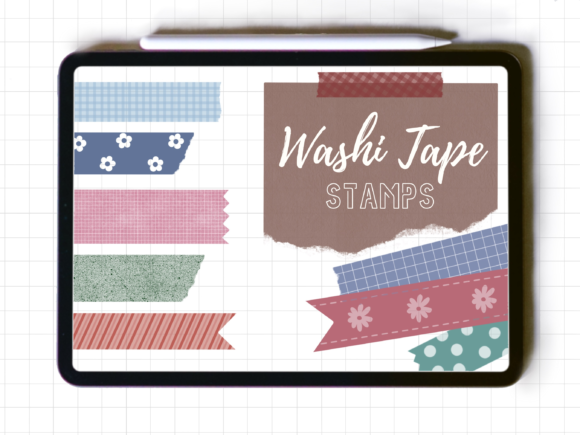
Digital journaling and illustration have evolved significantly with the introduction of specialized tools that mimic traditional media. Among these tools, the Washi Tape Stamp for Procreate has gained attention among artists seeking to add texture, structure, and a handcrafted aesthetic to their digital compositions. This resource is not a continuous brush but rather a curated set of twenty distinct stamp assets designed specifically for the Procreate ecosystem on iPad. For artists evaluating whether this digital asset aligns with their workflow, understanding its specific functionality, limitations, and ideal use cases is essential.
Understanding the Asset Structure
The core of this product is a .brushset file contained within a ZIP archive. Upon installation, users gain access to twenty individual washi tape stamps. It is crucial to distinguish these from standard brushes. A typical brush creates a continuous stroke that follows the movement of the Apple Pencil. In contrast, these assets function as stamps. Each tap places a discrete piece of "tape" onto the canvas. This distinction fundamentally changes how the tool is used. Instead of drawing lines, the artist places pre-defined shapes that resemble torn or cut strips of decorative tape.
These stamps were engineered exclusively for Procreate. They rely on the specific brush engine architecture of this software. Consequently, they will not function in other digital art applications such as Adobe Fresco, Clip Studio Paint, or Photoshop. Furthermore, the creator notes that these assets have been tested primarily with the Apple Pencil. While basic functionality might persist with other styluses, the pressure sensitivity and placement accuracy are optimized for the Apple ecosystem. This specificity ensures high performance for iPad users but limits cross-platform flexibility.
Key Benefits and Creative Flexibility
The primary advantage of using a dedicated Washi Tape Stamp for Procreate lies in efficiency and consistency. Creating realistic washi tape effects manually requires significant time. An artist must draw the rectangle, apply a semi-transparent texture, add rough edges to simulate tearing, and adjust blending modes to mimic the adhesive quality of real tape. This set automates that process, providing instant, high-quality results.
Flexibility is another major consideration. Although the stamps come with default appearances, they are fully adjustable. Users can change the color of each stamp to match their palette, ensuring seamless integration into any artwork. Opacity controls allow for subtle layering effects, mimicking the translucent nature of actual washi tape. Additionally, the ability to resize each stamp means that a single asset can serve as a small accent or a large structural element in a layout. This adaptability makes the set versatile for various artistic styles, from minimalist planning to complex mixed-media collages.
Tradeoffs and Technical Considerations
While convenient, this tool comes with specific tradeoffs that potential buyers must evaluate. The most significant limitation is the lack of continuity. Because these are stamps and not a continuous brush, creating long, unbroken strips of tape requires placing multiple stamps end-to-end. This can result in visible seams or overlapping textures if not managed carefully. Artists seeking a fluid, drawn-on-tape experience may find this method cumbersome compared to a custom-shaped brush that allows for continuous strokes.
Another consideration is the platform dependency. As a digital-only product compatible solely with Procreate, it excludes users who work across multiple devices or software platforms. If an artist frequently switches between an iPad and a desktop computer, they cannot utilize these assets in their desktop workflow. This siloed functionality requires users to commit to the Procreate environment for projects involving these elements.
Furthermore, the randomness of real washi tape tearing is pre-baked into the twenty provided designs. While twenty variations offer reasonable diversity, they do not provide infinite uniqueness. Heavy users who create vast amounts of collage-style art may eventually notice repetition in the edge textures. For such users, combining these stamps with manual editing or additional texture overlays may be necessary to maintain visual variety.
Ideal Use Cases
The Washi Tape Stamp for Procreate is particularly well-suited for specific types of digital art. Digital planners and journalers represent the primary audience. These users often need to quickly decorate pages, section off areas, or add decorative borders without spending hours on manual detailing. The stamp format allows for rapid placement and adjustment, streamlining the planning process.
Illustrators working in a mixed-media or collage style also benefit from this tool. The ability to layer semi-transparent tapes over drawings adds depth and a tactile feel to digital illustrations. It helps bridge the gap between clean digital lines and organic, traditional textures. Additionally, social media content creators who design quotes or graphics can use these stamps to frame text or highlight key information, adding a trendy, scrapbook-like aesthetic to their posts.
When to Consider Alternatives
Despite its benefits, this asset may not be the best fit for every artist. If your primary goal is to draw freehand lines that look like tape, a custom shape brush with texture dynamics might be more appropriate. Shape brushes allow for continuous drawing, which is faster for creating long borders or wrapping tape around objects in a perspective drawing. The stamp method is static and requires manual rotation and positioning for each segment, which can slow down dynamic sketching processes.
Additionally, artists who require cross-compatibility should look for universal brush formats or texture packs that can be imported into multiple programs. If you do not own an iPad or do not use Procreate, this product offers no value. In such cases, exploring generic PNG texture packs of washi tape might be a better investment, as these images can be imported into virtually any graphic design software.
Making the Decision
Choosing whether to integrate the Washi Tape Stamp for Procreate into your library depends on your workflow priorities. If you value speed, consistency, and a authentic scrapbook aesthetic within the Procreate environment, this set offers a practical solution. The instant download format means immediate access, allowing you to test the tools in your current projects without delay.
However, if you prefer continuous drawing capabilities or work across multiple software platforms, the limitations of this stamp-based system may outweigh its conveniences. Evaluate your typical project types. Do you frequently create digital journals or collage-style illustrations? If so, the twenty varied stamps provide a solid foundation. Do you need long, flowing lines of tape? If so, consider supplementing this set with a continuous tape brush or manual drawing techniques.
Ultimately, this digital product serves as a specialized tool rather than a comprehensive solution. It excels in its niche—adding quick, customizable, textured tape elements to Procreate artworks. By understanding its stamp-based nature and platform restrictions, artists can make an informed decision about whether it enhances their creative toolkit or if alternative methods better suit their artistic goals.