Evaluating Procreate Brush Christmas Wreath Letters for Holiday Digital Design
The holiday season presents a unique set of demands for digital artists and graphic designers. Whether you are creating social media content, designing printable greeting cards, or developing custom merchandise, the need for festive, high-quality typography is constant. Among the myriad of tools available to iPad users, Procreate Brush Christmas Wreath Letters has emerged as a specialized resource worth evaluating. This tool is not merely a font; it is a dynamic brush set designed specifically for the Procreate ecosystem, offering a distinct workflow compared to traditional text insertion methods.
For professionals and hobbyists alike, understanding the nuances of this product is essential before integrating it into your creative pipeline. This analysis explores what the brush set offers, how it compares to standard typography options, and helps you determine if it aligns with your specific design needs.
Understanding the Product Structure and Deliverables
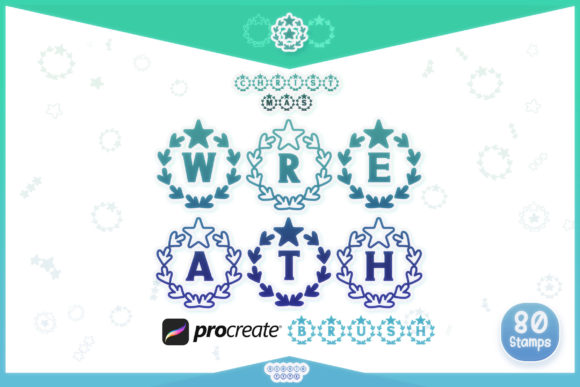
At its core, Procreate Brush Christmas Wreath Letters is a digital asset pack tailored for ease of use within the Procreate application. When you purchase this resource, you receive one zipped file containing a comprehensive brush set. The organization of this set is critical for efficient workflow. It includes twenty-six alphabet brush stamps in Style 1 and another twenty-six in Style 2. This dual-style approach provides immediate versatility, allowing designers to mix and match aesthetics without needing to switch between different files or apps.
Beyond the alphabetic characters, the set includes numbers from 0 to 9 in both styles. This inclusion is particularly valuable for designers working on calendars, advent countdowns, or price tags for holiday sales graphics. Additionally, the package contains various doodles, which serve as decorative elements to complement the lettering. These extra assets allow for the creation of cohesive compositions where text and imagery share a consistent visual language.
It is important to note a key limitation regarding format compatibility: this specific brush set is for use with Procreate only. If your workflow relies heavily on vector-based software like Adobe Illustrator or raster editors like Photoshop on a desktop, this tool will not integrate directly. However, for those whose primary creative environment is the iPad, the seamless integration offers significant time savings.
Brush Stamps Versus Traditional Fonts: A Functional Comparison
To evaluate the true value of Procreate Brush Christmas Wreath Letters, one must compare it against the most common alternative: standard digital fonts (TTF or OTF files). Most designers are accustomed to typing text using a keyboard and then adjusting kerning, leading, and weight. While this method offers precision, it often lacks the organic, hand-crafted feel that consumers associate with authentic holiday warmth.
Brush stamps operate differently. Each letter is a pre-rendered image that appears on the canvas when you tap. This method mimics the experience of using physical rubber stamps. The primary advantage here is texture and irregularity. Because each stamp is a fixed image, it retains the intricate details of the wreath design—such as individual pine needles, berries, and ribbon folds—without the rendering issues that can sometimes plague complex vector fonts at smaller sizes.
However, this approach comes with tradeoffs. Unlike a scalable vector font, brush stamps are raster-based. This means that while they look crisp at their intended size, enlarging them significantly may result in pixelation. Therefore, this tool is best suited for designs where the final output size is known and controlled, such as Instagram posts, web banners, or prints at specific dimensions. For large-format printing where infinite scalability is required, a vector SVG version might be more appropriate. Interestingly, for users who require that scalability, the creator notes that Font and SVG versions are available separately on the Numnim Type Store, providing a clear pathway for those who need cross-platform flexibility.
Aesthetic Versatility and Design Applications
The inclusion of two distinct styles within the Procreate Brush Christmas Wreath Letters set addresses a common pain point in digital design: monotony. Style 1 and Style 2 likely offer variations in density, orientation, or decorative emphasis. For instance, one style might feature a denser wreath composition suitable for bold headlines, while the other might be more delicate, ideal for subheaders or subtle accents.
This versatility makes the brush set suitable for a wide range of projects. Consider the creation of digital greeting cards. Using the brush stamps, a designer can quickly spell out "JOY" or "NOEL," layering the letters over watercolor backgrounds or minimalist flat colors. The doodles included in the set can be used to fill negative space, creating a balanced composition without the need for additional asset hunting.
Another practical application is in social media marketing. Small businesses often need to produce rapid content during the holiday rush. The speed of tapping a brush stamp versus manually arranging vector elements can reduce production time significantly. Furthermore, the organic nature of the wreath design resonates well with current design trends that favor authenticity and hand-made aesthetics over sterile, corporate minimalism.
Workflow Integration and Technical Considerations
Integrating Procreate Brush Christmas Wreath Letters into your workflow requires a shift in mindset from typing to composing. Since you cannot simply backspace and retype a letter, the process involves selecting the correct brush from the library and tapping it onto the canvas. This tactile approach can be surprisingly intuitive for artists who are already comfortable with Procreate’s interface.
One technical consideration is layer management. Each stamp creates a new layer or sits on the active layer, depending on your settings. To maintain editability, it is advisable to keep each letter on its own layer initially. This allows for individual adjustment of position, rotation, and color. Procreate’s powerful transformation tools enable you to tweak each letter’s placement to achieve natural-looking spacing, which is often superior to the rigid uniformity of automated font kerning.
Color customization is another strength. Since these are brush stamps, you can easily change their color using Procreate’s hue, saturation, and brightness adjustments. This allows you to match the wreath letters to any brand palette or color scheme, whether you prefer traditional reds and greens or modern metallics and pastels. This level of control is often more cumbersome with standard fonts, which may require converting text to shapes before advanced color grading can be applied.
Decision Factors: Is This Tool Right for You?
Choosing the right typographic tool depends on your specific project requirements and technical environment. Procreate Brush Christmas Wreath Letters is an excellent choice if you meet the following criteria:
- You work primarily on iPad: The tool is optimized for Procreate, leveraging its touch interface and brush engine.
- You value speed and texture: If you need to create festive graphics quickly without sacrificing the hand-drawn aesthetic, brush stamps are highly efficient.
- Your output is raster-based: For web graphics, social media, and standard prints, the resolution provided by the brushes is sufficient.
- You enjoy manual composition: If you prefer having control over the exact placement and rotation of each character, this method offers greater artistic freedom than auto-kerned fonts.
Conversely, you may need to consider alternatives if:
- You require vector scalability: If you are designing logos or large-format prints that need to be resized infinitely without quality loss, you should look for the SVG version available on the Numnim Type Store.
- You work exclusively on desktop: If your workflow is confined to Photoshop or Illustrator on a computer, this Procreate-specific tool will not be useful unless you export and import files, which adds unnecessary steps.
- You need extensive text bodies: Brush stamps are ideal for short words and headlines. For paragraphs of text, a traditional font is far more practical and readable.
Final Thoughts on Value and Utility
In the crowded market of digital design resources, Procreate Brush Christmas Wreath Letters distinguishes itself through its specificity and ease of use. It solves a particular problem—creating festive, textured typography on the iPad—without requiring advanced illustration skills. The inclusion of two styles, numbers, and doodles provides a comprehensive toolkit for holiday-themed projects.
While it is not a universal solution for all typography needs, its targeted utility makes it a valuable addition to the digital artist’s arsenal. By understanding its limitations regarding scalability and platform compatibility, you can make an informed decision. For those who prioritize workflow efficiency and aesthetic authenticity within the Procreate environment, this brush set offers a compelling balance of convenience and creative potential. Always consider the final output format of your project to ensure that raster-based brush stamps align with your technical requirements, or explore the vector alternatives if scalability is paramount.