India Ink Procreate Lettering Brush: A Review for Digital Artists
The transition from traditional media to digital illustration often presents a challenge for artists who value the organic imperfections of physical ink. The India Ink Procreate Lettering Brush aims to bridge this gap by simulating the distinct characteristics of India ink, Chinese ink, and Bombay ink within the Procreate ecosystem. For digital letterers, calligraphers, and illustrators, finding a brush that replicates the blotchy, inky texture of real-world materials is essential for creating work that feels authentic rather than sterile. This article evaluates the features, benefits, and practical considerations of using this specific digital tool to help you determine if it aligns with your artistic workflow.
Understanding the Digital Ink Simulation
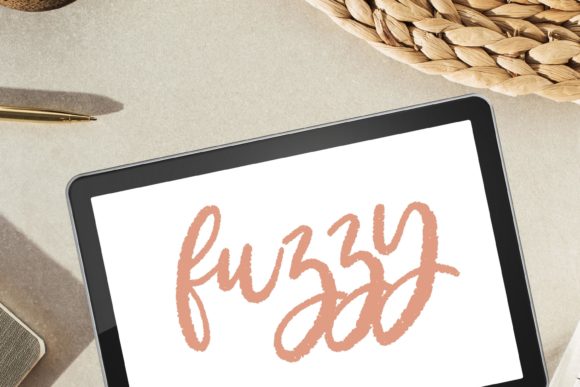
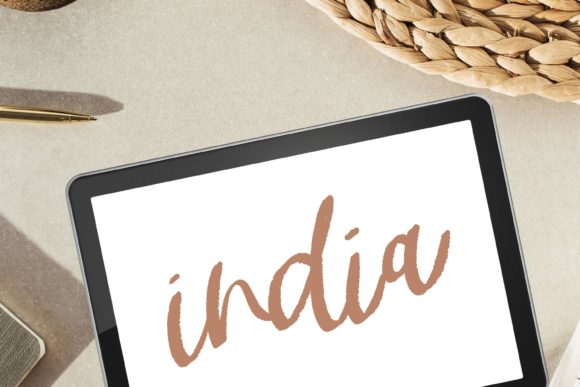
At its core, the India Ink Procreate Lettering Brush is a custom brush preset designed exclusively for the Procreate application on iPad. Unlike standard digital brushes that produce uniform, vector-like lines, this tool is engineered to introduce controlled randomness and texture. It mimics the behavior of liquid ink interacting with paper, incorporating elements such as bleed, grit, and fuzzy edges. The result is a stroke that varies in opacity and density, resembling the natural accumulation of pigment found in hand-lettered pieces using actual dip pens or brush pens.
The brush leverages Procreate’s engine to simulate the "blotchy" nature of Bombay ink and the deep, saturated darkness of traditional India ink. This is achieved through complex texture maps and dynamic settings that respond to pressure and tilt. For artists specializing in modern calligraphy or textured lettering, this means that every stroke carries a unique character, reducing the need for post-processing effects to add grain or noise manually.
Key Benefits for Hand Lettering and Painting
One of the primary advantages of adopting the India Ink Procreate Brush for Hand Lettering and Painting is the efficiency it brings to the creative process. Achieving a genuine grunge or fuzzy look in digital art often requires multiple layers of texture overlays, blending modes, and manual erasing. This brush integrates those textures directly into the stroke dynamics. As you draw, the brush naturally creates variations in line weight and edge quality, allowing for a more fluid and intuitive experience.
- Authentic Texture: The brush captures the essence of smooth ink mixed with grit, providing a realistic appearance that closely mirrors traditional media.
- Versatility: While optimized for lettering, the brush is equally effective for painting and digital illustration, offering a consistent aesthetic across different types of artwork.
- Immediate Usability: As a digital file available for instant download, there is no waiting period for shipping. Users can import the brush directly into Procreate on their iPad and begin working immediately.
- Enhanced Expressiveness: The inclusion of bleed and blurry edges allows for expressive, loose styles that are difficult to replicate with standard hard-edged digital brushes.
Technical Requirements and Compatibility
It is crucial to understand the technical constraints before purchasing. This product is a digital file; no physical product will be shipped. To use the Procreate Calligraphy Brush, you must have an iPad with the Procreate app installed. The files are not compatible with other software such as Adobe Fresco, Photoshop, or Clip Studio Paint, nor do they work on Android tablets or desktop computers without specific emulation setups that may not support Procreate-specific brush formats.
Installation requires downloading the file directly onto your iPad and opening it within the Procreate environment. Users unfamiliar with importing custom brushes may need to follow basic tutorial steps, but the process is generally straightforward. If you encounter difficulties during installation or usage, the creator offers support, noting that users should not hesitate to contact them for assistance. This level of support can be valuable for beginners navigating the nuances of digital brush management.
Evaluating Fit: When to Choose This Brush
The India Ink Procreate Lettering Brush is a strong fit for artists who prioritize a handcrafted, organic aesthetic in their digital work. If your style leans towards modern calligraphy, rustic signage, or illustrative projects that benefit from a textured, imperfect look, this tool can significantly enhance your output. It is particularly useful for creating social media graphics, wedding invitations, book covers, and branding materials where a human touch is desired over mechanical precision.
Furthermore, this brush is ideal for artists who struggle with the "too perfect" look of standard digital tools. By introducing natural variability, it helps break the monotony of uniform lines, adding depth and interest to compositions. For those who enjoy the tactile sensation of traditional ink but prefer the convenience and undo capabilities of digital art, this brush serves as an effective compromise.
Considerations and Potential Tradeoffs
While the textured lettering capabilities are robust, there are tradeoffs to consider. The very features that make this brush appealing—its blotchy, grunge, and fuzzy characteristics—may not suit projects requiring clean, crisp lines. For corporate logos, technical diagrams, or minimalist typography where precision is paramount, a smoother, more predictable brush might be a better choice. The inherent randomness of the ink simulation means that achieving consistent letterforms can require more practice and control compared to using a standard monoline brush.
Additionally, the performance of the brush depends on the processing power of your iPad. Highly textured brushes with complex dynamics can sometimes cause latency on older devices. Artists working on large canvases with high resolutions should test the brush to ensure it maintains responsiveness during rapid strokes. If you find the texture too aggressive, you may need to adjust the brush settings, such as streamline or opacity jitter, to tailor the effect to your preference.
Alternatives and Decision-Making Insights
When evaluating whether the India Ink Procreate Brush is right for you, consider your existing toolkit. If you already possess a library of textured brushes, assess whether this specific ink simulation offers something unique. The combination of India ink saturation with Bombay ink blotchiness is a specific niche. If your work primarily involves watercolor effects or pencil sketches, other specialized brushes might offer better results. However, if you frequently seek to replicate the look of dipped pen calligraphy or sumi-e painting, this brush provides a targeted solution.
It is also worth considering the learning curve. Transitioning to a brush with significant texture feedback requires adapting your hand movements. You may need to slow down your strokes to allow the texture to render correctly or experiment with pressure sensitivity settings. For artists willing to invest time in mastering these nuances, the payoff is a distinctive style that stands out in a crowded digital landscape.
Final Thoughts on Digital Ink Tools
The India Ink Procreate Lettering Brush represents a sophisticated option for digital artists seeking to infuse their work with the warmth and imperfection of traditional media. By effectively simulating the properties of India, Chinese, and Bombay inks, it offers a versatile tool for hand lettering, calligraphy, and painting. Its strength lies in its ability to produce smooth yet gritty textures that enhance the visual appeal of digital illustrations.
Before making a decision, reflect on your artistic goals. If you value organic textures and are comfortable working within the Procreate ecosystem on an iPad, this brush can be a valuable addition to your arsenal. Remember that it is a digital product requiring direct download and installation on your device. With proper usage and a willingness to explore its dynamic settings, the India Ink Procreate Lettering Brush can help you achieve a refined, authentic aesthetic that resonates with viewers seeking the charm of handcrafted art.