Mastering Digital Florals with the Procreate Brush Stamp Peony Flower
Digital illustration has democratized art, allowing creators to produce stunning visuals without the mess of traditional media. However, one persistent challenge for both beginners and seasoned professionals is the time required to render complex organic shapes. Flowers, particularly intricate blooms like peonies, demand a keen eye for layering, shading, and petal structure. This is where specialized tools become invaluable. The Procreate Brush Stamp Peony Flower offers a streamlined solution for artists looking to enhance their workflow while maintaining high aesthetic standards. By integrating this digital asset into your creative toolkit, you can bypass hours of manual detailing and focus on composition, color theory, and storytelling.
The Challenge of Rendering Complex Botanicals
Peonies are beloved in the design world for their lush, voluminous appearance. Yet, capturing their essence digitally is notoriously difficult. A single bloom consists of dozens of overlapping petals, each with subtle variations in curvature, transparency, and light reflection. For an illustrator working on a tight deadline, painting each petal from scratch can be prohibitive. Furthermore, consistency is key in commercial design; clients often require multiple floral elements that look cohesive across a brand identity, wedding invitation suite, or textile pattern.
Many artists struggle with the balance between efficiency and authenticity. Using basic round brushes often results in flat, unnatural-looking flowers, while custom-building complex brushes requires technical knowledge of brush engine settings that many creatives do not possess. The need for a resource that bridges this gap—offering pre-made, high-quality stamps that retain artistic flexibility—is significant. This is precisely the niche filled by the Procreate Brush Stamp Peony Flower set.
How Digital Stamps Enhance Creative Workflow
A brush stamp is not merely a static image; it is a dynamic tool within the Procreate ecosystem. When you utilize a Procreate Brush Stamp Peony Flower, you are leveraging a pre-configured asset that responds to your pressure sensitivity and tilt. This means that no two stamps need to look identical. You can vary the opacity, size, and rotation to create natural variation, mimicking the randomness found in nature.
The primary benefit here is speed. What might take thirty minutes to paint manually can be achieved in seconds with a stamp, allowing you to iterate on designs rapidly. This is crucial for professional illustrators who need to present multiple concepts to clients. Instead of spending hours on a single draft, you can explore various layouts and color palettes quickly. Moreover, because these are digital layers, they remain fully editable. You can adjust hues, add textures, or erase specific parts of the stamp to customize the look, ensuring that your final piece remains unique and hand-crafted in feel, despite the use of automation tools.
Practical Applications for Designers and Artists
The versatility of the Procreate Brush Stamp Peony Flower extends across numerous industries. Here are several practical scenarios where this tool proves indispensable:
- Wedding and Event Stationery: Invitation designers often need elaborate floral borders and centerpieces. Using peony stamps allows for the creation of lush, romantic frames that can be easily resized and rearranged to fit different card dimensions.
- Surface Pattern Design: For those creating fabrics, wallpapers, or wrapping paper, repeating patterns are essential. Stamps enable the quick placement of focal flowers, which can then be supplemented with smaller filler elements to create seamless, engaging repeats.
- Social Media Content: Influencers and digital marketers require eye-catching graphics daily. Incorporating high-quality floral elements into quotes, announcements, or product mockups adds a touch of elegance and professionalism without requiring advanced illustration skills.
- Clip Art and Stock Assets: Artists who sell digital goods can use these stamps as a base to create unique clip art collections. By modifying colors and adding hand-drawn details, you can produce a diverse library of assets for resale.
Understanding the Product Components
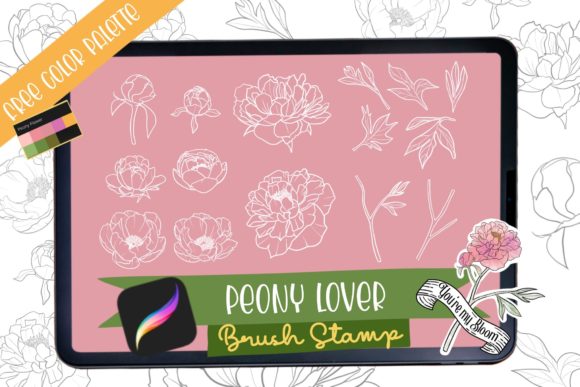
To maximize the utility of this tool, it is important to understand what is included in the package. Typically, a high-quality set like the Procreate Brush Stamp Peony Flower comes as an instant digital download. Upon payment confirmation, you receive a zipped file containing the essential components: the Procreate brush file itself, a set of 15 distinct brush stamps, and a swatch color guide.
The inclusion of 15 different stamps is critical. A single shape would result in repetitive, artificial-looking compositions. With fifteen variations, you have access to different angles, bloom stages (from bud to full bloom), and petal arrangements. The accompanying swatch color file is equally valuable, providing curated palettes that ensure your flowers look harmonious. These pre-selected colors save time on color theory experimentation and help maintain a consistent mood across your artwork.
It is vital to note that this is a digital download. No physical product will be shipped. This immediacy is a significant advantage for creators working under tight deadlines. Once the file is downloaded, it can be imported directly into Procreate on your iPad, allowing you to start creating immediately. However, users must be aware that refunds are generally not available for digital items due to the nature of the product, so ensuring compatibility with your device and software version beforehand is recommended.
Tailoring the Approach to Your Skill Level
Different users will approach the Procreate Brush Stamp Peony Flower in unique ways, depending on their experience and goals.
For Beginners: The primary goal is often confidence building. Manual flower painting can be discouraging when results do not match expectations. Using stamps allows beginners to create beautiful compositions quickly, helping them understand layering, masking, and color blending without the frustration of poor drawing skills. It serves as an educational tool, allowing them to deconstruct how professional florals are assembled.
For Intermediate Artists: The focus shifts to customization. These users might use the stamps as a underpainting or base structure, then go in with standard brushes to add unique textures, veins, and highlights. This hybrid approach combines the speed of stamps with the personal touch of hand-painting, resulting in work that is both efficient and distinctive.
For Professionals: Efficiency and scalability are paramount. Professionals may use these stamps to block out compositions for client approval before committing to detailed rendering. They might also use the stamps to generate background elements, allowing them to reserve their energy for the focal points of the illustration. The ability to rapidly prototype ideas is a competitive advantage in commercial freelancing.
Best Practices for Natural-Looking Results
While stamps are powerful, relying on them too heavily can lead to stiff, repetitive art. To ensure your work remains organic and engaging, consider the following recommendations:
- Vary Opacity and Size: Never place stamps at 100% opacity and uniform size. Reduce opacity to allow underlying layers to show through, creating depth. Randomize sizes to mimic perspective and natural growth patterns.
- Rotate and Flip: Use the transform tool to rotate and flip your stamps. This breaks up symmetry and prevents the "cookie-cutter" look. Mirroring a stamp can make it appear as a completely different flower.
- Layering is Key: Build your flowers in layers. Place darker, smaller stamps at the center and lighter, larger ones on the outside. Add separate leaf and stem elements to ground the flowers in the composition.
- Add Hand-Drawn Details: Use a textured brush to add subtle imperfections, such as torn petal edges or watercolor bleeds. These small details signal to the viewer that the piece is artisanal, not just a digital assembly.
Conclusion
The Procreate Brush Stamp Peony Flower is more than just a shortcut; it is a strategic tool for modern digital artists. It addresses the common pain points of time consumption and technical difficulty associated with botanical illustration. By providing a versatile, high-quality set of digital assets, it empowers creators to produce professional-grade work efficiently. Whether you are designing wedding invitations, creating surface patterns, or simply exploring digital art as a hobby, integrating these stamps into your workflow can elevate your output and free up creative energy for what matters most: your unique artistic vision. Embrace the blend of technology and tradition, and watch your digital gardens bloom with ease and elegance.