Refining Digital Texture with the Feather Procreate Stamp Brush
Digital illustration has evolved significantly over the last decade, moving from flat vector aesthetics to rich, textured compositions that mimic traditional media. For artists working within the iPad ecosystem, the search for tools that bridge this gap is constant. The Feather Procreate Stamp Brush emerges as a specialized solution designed to address a specific need in digital painting: the efficient application of organic, soft-edge textures. Unlike standard round brushes that require manual modulation of opacity and flow to achieve subtle gradients, this stamp brush set offers a pre-configured approach to texture layering.
This analysis explores the practical utility of the 10-brush set, examining its technical requirements, workflow integration, and suitability for various creative professionals. The goal is to determine whether this asset serves as a mere novelty or a genuine productivity enhancer for serious creators.
Understanding the Tool’s Core Functionality
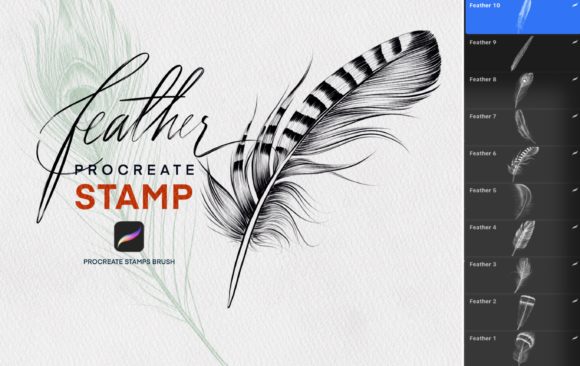
The term "stamp brush" in Procreate refers to a brush type that places a static image or shape onto the canvas with each tap, rather than drawing a continuous line based on velocity and pressure. The Feather Procreate Stamp Brush leverages this mechanic to deposit high-resolution feather textures. These are not simple circular blurs; they are complex, irregular shapes that replicate the intricate structure of real plumage.
The set includes ten distinct variations. This variety is crucial because natural feathers are rarely uniform. Some are downy and soft, suitable for background fluff or cloud-like structures, while others are more structured with defined vanes, ideal for foreground details. By providing multiple options, the set allows artists to build depth without relying on a single repetitive pattern, which can make digital art look artificial.
It is important to note that this tool is exclusively compatible with the Procreate app. It does not function in Photoshop, Clip Studio Paint, or other desktop software. This limitation is inherent to the file format (.brushset) used by Procreate. Therefore, its value is strictly tied to the mobile iPad workflow.
Technical Prerequisites and Compatibility
Before acquiring any digital asset, verifying system compatibility is essential to avoid frustration. The Feather Procreate Stamp Brush requires a specific hardware and software environment to perform optimally. Users must possess an iPad Pro or a standard iPad model capable of running recent iOS versions. More importantly, the Apple Pencil is a required peripheral. While Procreate supports touch input, the precision needed to place stamp brushes accurately—especially when layering them for density—is significantly enhanced by the pressure sensitivity and tilt support of the Apple Pencil.
On the software side, the app must be updated to Procreate Version 5.0 or higher. This version requirement is not arbitrary. Version 5.0 introduced significant improvements to the brush engine, including better handling of stamp spacing, jitter, and texture blending. Older versions may fail to render the brush tips correctly or may not support the specific grain settings used in these custom brushes. Ensuring your software is up to date guarantees that the brushes behave as intended by the creator.
Workflow Integration and Practical Application
The primary advantage of using a stamp brush over a standard paint brush is speed. Creating realistic feather textures manually involves thousands of individual strokes, careful opacity adjustments, and extensive layer management. With the Feather Procreate Stamp Brush, an artist can establish a base texture in seconds. This efficiency is particularly valuable for professionals working under tight deadlines, such as concept artists, illustrators, and graphic designers.
In practice, these brushes excel in several scenarios:
- Character Design: Adding realistic plumage to birds, mythical creatures like griffins or harpies, or fantasy characters with feathered accessories.
- Environmental Art: Creating soft, atmospheric elements such as distant foliage, mist, or abstract organic backgrounds.
- Textile Design: Simulating fur or soft fabrics where edge definition is less critical than overall volume and texture.
However, the tool is not a "one-click" solution for masterpieces. Effective use requires an understanding of layering. A common mistake among beginners is overstamping, which results in a muddy, opaque mass. Professional usage involves varying the opacity of the brush, changing colors subtly between stamps, and using clipping masks to constrain the texture within specific shapes. The ten different brush tips allow for this variation, enabling the artist to switch between broad, soft stamps for volume and sharper, detailed stamps for definition.
Evaluating Quality and Usability
The quality of a digital brush is determined by the resolution of its source image and the logic of its settings. The Feather Procreate Stamp Brush demonstrates high-quality source imagery. The edges are clean, avoiding the pixelation that plagues lower-resolution assets. This ensures that even when scaled up, the texture remains crisp and believable.
Usability is further enhanced by the intuitive organization of the set. The ten brushes are typically categorized by density or style, allowing for quick selection during the creative process. In a fast-paced workflow, minimizing menu diving is critical. The consistency across the set means that once an artist understands how one brush interacts with the canvas, they can predict the behavior of the others, reducing the learning curve.
Flexibility is another strong point. Because these are Procreate brushes, their settings are fully editable. An experienced user can adjust the spacing, scatter, size jitter, and color dynamics to customize the effect. This openness transforms the asset from a static tool into a adaptable component of the artist’s toolkit. For educators and tutorial creators, this flexibility allows for demonstrations of how digital tools can be modified to suit specific artistic visions.
Target Audience and Value Proposition
Who benefits most from this specific tool? The Feather Procreate Stamp Brush is ideally suited for:
- Freelance Illustrators: Who need to produce high-volume work efficiently without sacrificing textural quality.
- Concept Artists: Who require rapid prototyping of creature designs or environmental moods.
- Hobbyists and Students: Who are learning digital painting and want to understand how texture layers contribute to realism.
- Small Business Owners: Such as print-on-demand sellers who create nature-themed designs and need scalable, high-quality assets.
For marketers and bloggers creating visual content, these brushes can add a unique, organic aesthetic to social media graphics or blog headers, distinguishing their brand from competitors using generic stock vectors.
The long-term value lies in the time saved. While a skilled artist can paint feathers manually, the hours invested may not yield a proportional return on investment for commercial projects. This brush set offers a balance between automation and artistic control, allowing for rapid iteration while maintaining a hand-crafted feel.
Limitations and Considerations
No tool is without limitations. The primary constraint of the Feather Procreate Stamp Brush is its specificity. It is designed for feather-like textures. While creative users can repurpose these stamps for clouds or smoke, they are not optimized for those effects. Artists seeking a comprehensive texture library will need to supplement this set with other brushes for skin, metal, wood, or water.
Additionally, the reliance on the iPad ecosystem means that workflows are tethered to mobile devices. For studios that rely on desktop-based pipelines, integrating these assets requires exporting files from Procreate, which can introduce extra steps. However, for iPad-centric creators, this is a non-issue.
There is also a risk of over-reliance. If an artist uses the stamps without adjusting color, rotation, or scale, the resulting artwork can look repetitive and artificial. The tool demands artistic judgment to blend the stamps seamlessly into the broader composition. It is an aid, not a replacement for fundamental drawing skills.
Final Thoughts on Utility
The Feather Procreate Stamp Brush represents a focused, high-quality addition to the Procreate ecosystem. It addresses a niche but common challenge in digital illustration: the efficient creation of complex organic textures. By providing ten varied, high-resolution stamp options, it offers both immediate utility and long-term flexibility.
For professionals and serious hobbyists already invested in the iPad and Apple Pencil workflow, this set is a logical enhancement. It streamlines the texturing process, allowing creators to focus more on composition and lighting rather than tedious repetitive strokes. While it requires a mindful approach to avoid visual repetition, its potential to accelerate workflow and enhance visual depth makes it a worthwhile consideration for anyone looking to refine their digital painting toolkit.