Mastering Sweet Pinky Heart Brush Strokes for Professional Design Results
Integrating hand-drawn elements into digital design adds a layer of warmth and authenticity that sterile, geometric shapes often lack. Sweet Pinky Heart Brush Strokes offers a curated collection of these organic textures, designed to elevate projects ranging from wedding invitations to modern branding. However, many creators rush into using such assets without fully understanding the technical specifications or licensing nuances, leading to pixelated prints or inefficient workflows. By approaching this digital product with a clear strategy, you can avoid common pitfalls and maximize the value of your purchase.
Understanding the Asset Quality and Resolution
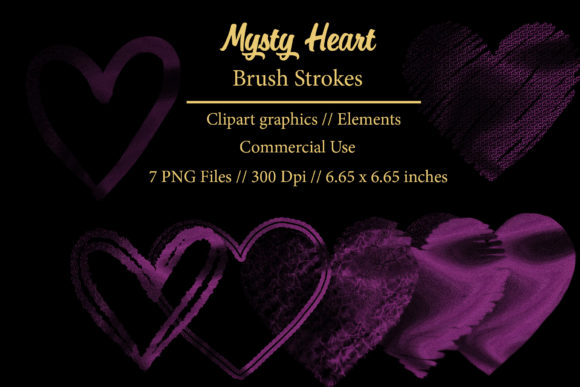
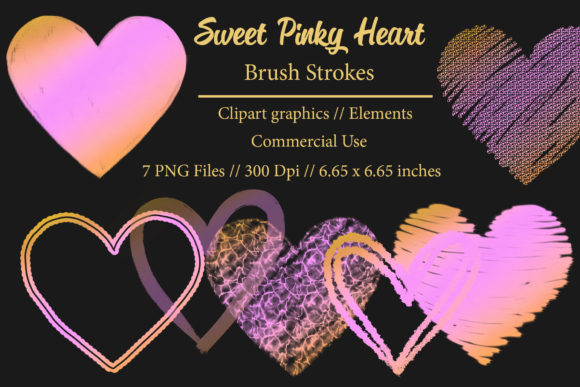
One of the most frequent misunderstandings among beginners involves resolution expectations. This package provides elements at 300 dpi (dots per inch), which is the industry standard for high-quality printing. A common mistake is assuming that any image found online is print-ready. When you download lower-resolution files, perhaps 72 dpi intended only for screens, and attempt to print them on physical goods like mugs or fabric, the result is often blurry or jagged.
With Sweet Pinky Heart Brush Strokes, each element is sized at 6.65 x 6.65 inches. This specific dimension is crucial for planning your layout. If you attempt to stretch these images beyond their native size in software like Photoshop or Canva, you will degrade the quality. Conversely, shrinking them is generally safe, but you must maintain the aspect ratio to prevent distortion. Always check the image properties before placing them into your final design canvas to ensure they meet the dimensional requirements of your project.
The Importance of Proper File Extraction
A surprisingly common issue arises not from the design itself, but from the file handling process. The product arrives as a .ZIP file containing seven individual transparent PNG elements. Many users, particularly those on mobile devices or unfamiliar with desktop file management, attempt to open the ZIP file directly or use preview tools that do not fully extract the contents. This can lead to corrupted data or an inability to access the high-resolution layers.
To avoid this frustration, always extract the folder after downloading. On Windows, right-click the file and select "Extract All." On Mac, double-clicking usually suffices, but verifying the extracted folder contains all seven PNGs is a wise precaution. Working directly from within a compressed archive can cause software lag and may prevent transparency features from rendering correctly in your design application. Taking this extra minute ensures that every brush stroke retains its crisp edges and transparent background, which is essential for layering over photos or colored backgrounds.
Leveraging Transparency for Versatile Designs
The core value of these PNG elements lies in their transparent backgrounds. A significant error novice designers make is trying to remove backgrounds manually using eraser tools or magic wands, which often leaves behind ugly white halos or jagged edges. Since Sweet Pinky Heart Brush Strokes are pre-prepared with transparency, you can drag and drop them directly onto any surface.
This feature is particularly vital for sublimation designs and print-on-demand products. For instance, when creating a design for a t-shirt or a mug, the transparency allows the color of the garment to show through the empty spaces of the heart shape. If you were to use a JPEG with a white background, you would end up with an unsightly white box around your heart, ruining the professional look of the merchandise. Utilizing the PNG format correctly ensures seamless integration into complex compositions, whether you are designing stickers, planner goodies, or blog graphics.
Common Licensing and Usage Misconceptions
When purchasing digital products, it is essential to distinguish between personal and commercial use rights. While this article focuses on the technical application, understanding what you are buying is part of the decision-making process. You are purchasing a digital product, not a physical item. Some users mistakenly expect a shipped package or physical prints. Clarifying this expectation prevents disappointment and helps you prepare your digital workspace immediately upon purchase.
Furthermore, consider the scope of your projects. These elements are suitable for invitations, stationery, business cards, and even logos. However, a mistake many entrepreneurs make is using stock elements as the sole component of a trademarkable logo. While you can use these hearts in your branding, relying entirely on a pre-made asset may limit your ability to trademark the design exclusively. A better approach is to combine these brush strokes with unique typography or other custom graphics to create a distinct brand identity. This adds value and originality to your web decor and advertising materials.
Optimizing Workflow for Different Projects
Different applications require different approaches. For planners and stickers, the 6.65-inch size is generous, allowing you to scale down multiple hearts onto a single sheet. For business cards, you might use a single, small heart as a subtle accent. A common inefficiency is resizing elements repeatedly for different platforms. Instead, create a master file where you arrange your favorite combinations. Save this as a template for future use.
For educators and bloggers, these hearts can break up text blocks or highlight key quotes. Avoid cluttering the page; use the negative space effectively. The organic nature of the brush strokes means they pair well with handwritten fonts but may clash with overly rigid, industrial typefaces. Testing contrast and balance before finalizing your design saves time during the revision phase.
Checklist Before Finalizing Your Design
Before you send your files to print or publish them online, perform a quick audit:
- Resolution Check: Ensure your document is set to 300 dpi for print or 72 dpi for web, matching the source quality.
- Edge Inspection: Zoom in to 100% to verify no white pixels remain around the transparent edges.
- Color Consistency: Verify that the pink hue matches your brand palette across different devices.
- File Format: Save your final design in the appropriate format (PDF for print, PNG/JPG for web).
By paying attention to these details, you transform simple clip art into professional-grade design components. Sweet Pinky Heart Brush Strokes provides the raw material, but your attention to technical precision determines the final quality. Whether you are a freelancer creating client deliverables or a hobbyist making gifts, respecting the file specifications and leveraging the transparency will yield superior results. Avoid the temptation to cut corners on extraction and resolution checks; these small steps define the difference between amateur and polished work.
Ultimately, the goal is to enhance your creative expression without being hindered by technical errors. Use these seven elements as building blocks. Experiment with layering, opacity, and blending modes in your software. The more you understand the tools you are working with, the more efficiently you can produce DIY projects that look professionally crafted. This mindful approach ensures that every project, from a simple sticker to a complex sublimation design, reflects the care and quality intended by the creator.