Mastering Tropical Leaf Shapes in Photoshop: A Guide to Scalable Vector Design
In the vibrant world of digital design, few elements capture the imagination quite like tropical foliage. From lush monstera leaves to delicate palm fronds, these organic forms bring a sense of life, energy, and exotic beauty to any project. However, integrating these complex natural shapes into your workflow can be challenging if you rely solely on raster images. This is where specialized arbitrary shapes become an invaluable asset for designers using Adobe Photoshop and Illustrator.
Whether you are creating social media graphics, packaging designs, or web banners, understanding how to utilize vector-based shape files can significantly elevate the quality and efficiency of your work. In this article, we will explore the technical advantages of using shape layers, the versatility of file formats like .csh, .ai, and .eps, and how these tools fit into modern creative workflows.
Understanding Arbitrary Shapes in Photoshop
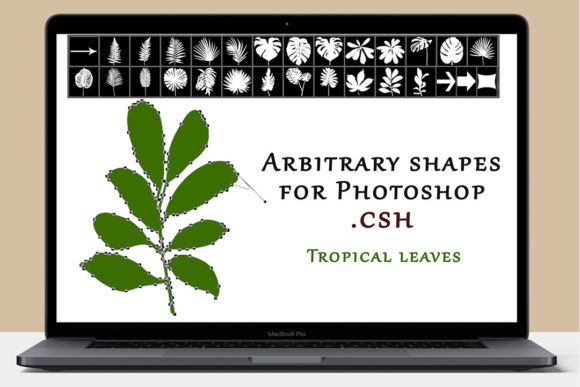
To fully appreciate the value of a tropical leaf shape pack, it is essential to understand what an "arbitrary shape" actually is within the context of Adobe Photoshop. Unlike a standard pixel-based image (such as a JPEG or PNG), a shape in Photoshop is fundamentally different. It is a fill layer associated with a vector mask.
This distinction is crucial for several reasons:
- Scalability: Because the shape is defined by mathematical paths rather than pixels, it retains perfect clarity regardless of size. You can scale a tiny leaf icon up to the size of a billboard without any loss in quality or pixelation.
- Editability: Each shape consists of clear outlines and corners that are controlled by nodes (anchor points). This means you are not stuck with the default form. You can adjust individual nodes to tweak the curvature of a leaf tip or the depth of a split in a monstera leaf.
- Non-Destructive Workflow: Since the shape is a vector mask, you can change its color, position, and size at any time without degrading the original data. This allows for rapid experimentation during the design process.
When you download a package containing tropical leaves, you are essentially acquiring a library of pre-drawn vector paths. This saves hours of manual pen-tool work, allowing you to focus on composition and creativity rather than tedious tracing.
The Power of Vector Formats: AI, EPS, and CSH
A high-quality design resource pack typically includes multiple file formats to ensure compatibility across different software and use cases. When you receive a ZIP folder with tropical leaf assets, you will likely find three key types of files: .csh (Custom Shape), .ai (Adobe Illustrator), and .eps (Encapsulated PostScript).
Here is how each format serves a specific purpose in your design toolkit:
- .csh Files for Photoshop: These are native Photoshop Custom Shape files. Once loaded into your library, they appear in the Custom Shape Tool dropdown menu. This allows for instant drag-and-drop placement directly onto your canvas. It is the fastest way to incorporate tropical elements into a Photoshop composition.
- .ai Files for Illustrator: Adobe Illustrator is the industry standard for vector graphic creation. The .ai files allow you to open the tropical leaves in Illustrator, where you have advanced control over bezier curves and path operations. You can modify the shapes extensively here before importing them into other programs.
- .eps Files for Universal Compatibility: EPS is a legacy vector format that is widely supported by various design applications, including CorelDRAW, InDesign, and older versions of Adobe software. Including EPS ensures that your tropical leaf shapes are accessible regardless of the specific software ecosystem you or your clients use.
Practical Applications in Modern Design
The integration of tropical leaf shapes extends far beyond simple decoration. In modern business and creativity, these elements serve functional and aesthetic roles across various industries.
Branding and Identity
Many brands in the wellness, beauty, and hospitality sectors utilize botanical motifs to convey freshness, organic quality, and relaxation. A spa might use soft palm fronds in their branding to evoke a sense of calm, while a juice bar might use bold monstera leaves to signal tropical flavors. Using vector shapes ensures that these logos look crisp on both a small business card and a large storefront sign.
Digital Marketing and Social Media
In the fast-paced world of social media, visual appeal is paramount. Tropical leaves provide excellent framing devices for text and product photos. Because the shapes are vector-based, you can easily recolor them to match your brand’s specific palette. For instance, you might change a green leaf to a pastel pink to suit a spring campaign or a deep gold for a luxury holiday promotion. The ability to create as many copies as you like, change their position, and adjust their opacity allows for dynamic, layered compositions that grab attention in crowded feeds.
Print and Packaging Design
When designing physical products, such as cosmetic packaging or textile patterns, precision is key. Raster images can sometimes result in jagged edges when printed at high resolutions. Vector shapes, however, print with perfectly smooth edges. Designers can create seamless patterns using tropical leaves, repeating and rotating the shapes to cover large surfaces without visible seams or quality degradation.
Common Misunderstandings About Vector Shapes
Despite their advantages, there are some common misconceptions about using arbitrary shapes in Photoshop that often confuse beginners.
Misconception 1: "Vectors are only for Illustrator."
While Illustrator is built for vectors, Photoshop’s shape layers are incredibly powerful. Many designers prefer staying within Photoshop for their entire workflow. Understanding that a shape layer is a vector mask allows you to leverage the best of both worlds: the pixel-editing power of Photoshop and the scalability of vectors.
Misconception 2: "You cannot edit downloaded shapes."
Some users assume that once a shape is imported, it is fixed. In reality, because each shape has clear outlines and corners adjustable via nodes, you have full creative control. You can use the Direct Selection Tool to move anchor points, add new points, or convert corners to curves, effectively customizing the tropical leaf to fit your unique vision.
Misconception 3: "Complex shapes slow down the computer."
While extremely complex vector paths can require more processing power, optimized tropical leaf shapes are generally lightweight. They are far more efficient than high-resolution raster images with transparent backgrounds, especially when used in large quantities or repeated patterns.
How to Get Started with Your Tropical Leaf Pack
If you have just purchased or downloaded a set of tropical leaf shapes, here is a simple workflow to begin your project:
- Install the .csh file: Open Photoshop, select the Custom Shape Tool, click on the shape picker in the options bar, and load your new shapes from the menu.
- Drag and Drop: Select a leaf shape and draw it on your canvas. Hold the Shift key while dragging to maintain the correct proportions.
- Customize: Use the Properties panel to change the fill color. Use the Direct Selection Tool (the white arrow) to tweak specific nodes if you want to alter the leaf’s shape.
- Experiment with Blending Modes: Try setting the shape layer’s blending mode to "Multiply" or "Overlay" to create interesting interactions with background textures or photos.
Conclusion
Incorporating tropical leaf shapes into your design projects offers a blend of aesthetic beauty and technical efficiency. By utilizing vector-based arbitrary shapes, you ensure that your work remains scalable, editable, and professional-grade. Whether you are a beginner looking to enhance your social media posts or an experienced designer working on complex branding identities, these tools provide the flexibility needed in modern creative environments.
Remember, the key to mastering these assets lies in understanding the nature of vector masks and leveraging the different file formats provided in your ZIP folder. With the ability to adjust nodes, change colors instantly, and scale without quality loss, you are equipped to create stunning, nature-inspired designs with ease.
Thank you for visiting my store. I hope these tools inspire your next creative project.
Svetlana