Unlocking Creativity: A Guide to Using Baby Procreate Brush Stamps on iPad
In the rapidly evolving world of digital art, tools that bridge the gap between technical skill and creative expression are invaluable. For artists, designers, and hobbyists using the iPad, Procreate has become the industry standard. However, even the most talented artists can benefit from resources that streamline their workflow. This is where specialized assets, such as Baby Procreate Brush Stamps, come into play. These digital tools offer a unique blend of convenience and artistic freedom, allowing users to incorporate charming, hand-drawn elements into their designs with ease.
This article explores the significance of these digital stamps, how they function within the Procreate ecosystem, and why they are an essential addition for anyone looking to enhance their digital craft projects, particularly those focused on baby-themed designs.
Understanding Digital Brush Stamps in Procreate
To fully appreciate the value of baby-themed brush stamps, it is important to first understand what they are. In traditional art, a "stamp" might refer to a physical rubber stamp used to imprint an image onto paper. In the digital realm, specifically within Procreate, a brush stamp is a pre-designed graphic that acts as a brush tip. When you tap or drag your Apple Pencil across the canvas, instead of laying down a simple line or dot, the software places the entire image—such as a baby stroller, a pacifier, or a tiny foot—onto your artwork.
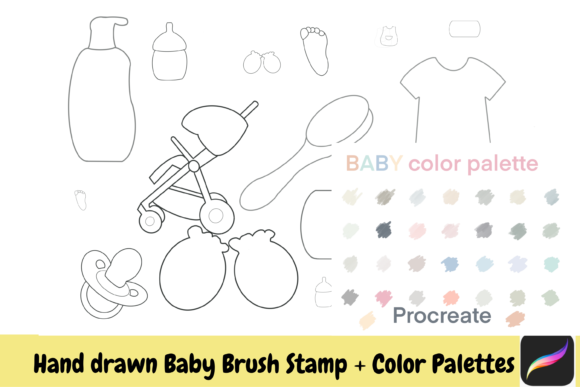
These assets are not static clipart that you simply copy and paste. They are integrated into the brush engine of Procreate. This means you can control their size, opacity, and spacing just like any other brush. The specific collection featuring hand-drawn baby elements includes a diverse range of items such as baby gloves, soap, shampoo bottles, aprons, bottles, suits, combs, and pacifiers. Each element is crafted with a distinct aesthetic that mimics the warmth and imperfection of hand-drawn illustrations, adding a personal touch that sterile vector graphics often lack.
The Advantage of Hand-Drawn Aesthetics
Why choose hand-drawn stamps over polished, computer-generated icons? The answer lies in emotional resonance. Baby-themed projects, whether they are for nursery decor, baby shower invitations, or children’s book illustrations, thrive on softness and approachability. Hand-drawn lines possess a natural irregularity that feels organic and welcoming. When you use a Baby Procreate Brush Stamp, you are injecting that handmade feel into your digital workspace without spending hours sketching each individual item from scratch.
Practical Applications for Creators and Businesses
The versatility of these brush stamps extends far beyond simple doodling. For small business owners and freelance designers, time is money. Creating custom illustrations for every client project can be prohibitively time-consuming. By utilizing an instant download pack of baby-themed stamps, creators can significantly reduce production time while maintaining high-quality output.
- Nursery Decor Design: Create custom wall art prints featuring repeating patterns of baby bottles, rattles, and strollers.
- Invitation Suites: Design cohesive baby shower or birth announcement cards by scattering elements like baby feet and pacifiers around the text.
- Digital Scrapbooking: Enhance digital memory books with realistic, hand-drawn icons representing daily baby care routines, such as bathing (soap and shampoo) or feeding.
- Product Mockups: Small businesses selling baby clothes can use the baby suit and apron stamps to create engaging social media content or packaging designs.
Because these files are approved for small commercial use, they provide a legal and ethical way for entrepreneurs to incorporate professional-grade assets into products they sell. This opens up new revenue streams for artists who may not have the time to draw every element themselves but still want to offer unique, illustrated products.
Customization and Creative Freedom
A common misconception about digital stamps is that they limit creativity by forcing the user into a predefined style. On the contrary, these Procreate brushes are designed to be a starting point, not the final destination. The true power lies in customization, particularly through the use of the color palette.
Mastering Color Integration
When you download and install these brushes, the default color might be black or a standard gray. However, Procreate’s robust color engine allows you to change the hue of the stamp instantly. Imagine designing a gender-neutral nursery theme; you can select soft sage greens, warm yellows, or muted terracottas from your palette and apply them to the baby gloves, combs, or strollers with a single tap. This ability to recolor ensures that the stamps fit seamlessly into any design scheme, whether it is pastel, vibrant, or monochromatic.
Furthermore, because these are brushes, you can layer them. You might place a baby bottle stamp down, lower its opacity, and then paint over it with a different texture to create a watercolor effect. The possibilities are limited only by your imagination. The prompt to "apply on Procreate iPad only for your craft from imagination" is an invitation to experiment. You are not just placing images; you are composing scenes.
Technical Setup and Installation
For beginners, the technical aspect of using digital brushes can seem daunting. However, the process is straightforward. When you purchase this collection, you will receive a file that requires you to unzip it. This is a standard compression method used to keep file sizes manageable during download. Once unzipped, you will find the .brushset or .procreatebrush files.
- Download and Unzip: Locate the downloaded file on your iPad or computer. If on a computer, unzip the folder and transfer the files to your iPad via AirDrop, iCloud, or email. If on an iPad, use the Files app to unzip the archive directly.
- Import to Procreate: Tap on the brush file. It should automatically open in Procreate and install the new brush set into your library.
- Organize: Open Procreate and locate the new brush set. It is helpful to rename it or move it to a frequently used section for easy access.
It is crucial to note that these brushes are optimized specifically for Procreate on iPad. They rely on the Apple Pencil’s pressure sensitivity and the iPad’s touch interface to function correctly. Attempting to use them in other software may result in compatibility issues or a loss of functionality.
Building a Broader Creative Workflow
Incorporating these baby-themed stamps into your workflow does more than just save time; it encourages a more playful approach to digital art. When the technical barrier to drawing complex objects like a detailed baby stroller or a folded baby suit is removed, you are free to focus on composition, storytelling, and color theory. This shift in focus can lead to higher quality work and a more enjoyable creative process.
Moreover, using pre-made assets responsibly is a key skill in modern digital design. It teaches resource management and efficiency. By combining these stamps with your own hand-lettering or background textures, you create hybrid artworks that are unique to your style. The stamps become part of your visual vocabulary, allowing you to communicate themes of care, infancy, and tenderness effectively.
Conclusion
The Baby Procreate Brush Stamps collection represents a powerful tool for digital artists seeking to infuse their work with charm and efficiency. From the hand-drawn baby foot to the intricate details of a baby apron, each stamp offers a gateway to faster, more expressive creation. By understanding how to install, customize, and integrate these assets, you can elevate your Procreate projects, whether for personal joy or small commercial ventures. Embrace the flexibility of digital art, experiment with your color palette, and let these whimsical elements inspire your next masterpiece.