Evaluating the Procreate Color Palette Sunflower for Digital Artists
Digital illustration relies heavily on color theory and efficient workflow management. For artists using iPad-based software, pre-configured color sets can significantly reduce the time spent mixing hues manually. The Procreate Color Palette Sunflower is a specialized digital asset designed to streamline this process for creators focusing on warm, organic, or botanical themes. This article evaluates the utility, technical requirements, and artistic applications of this palette to help you determine if it aligns with your creative workflow.
Understanding the Product Structure
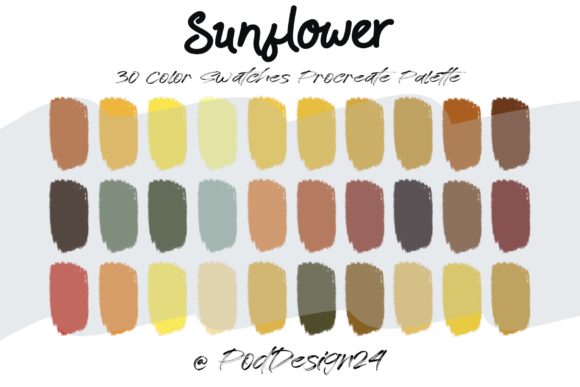
The core offering is a curated collection of thirty distinct colors inspired by the natural tones of sunflowers. Unlike standard system palettes, which often require manual adjustment to achieve specific saturation or brightness levels, this product provides a ready-to-use spectrum. When you purchase this item, you receive a ZIP file containing a swatch file compatible with Procreate. The installation process is straightforward: after downloading and extracting the file, users import the swatch directly into the Procreate application, where it automatically populates the palette interface.
It is crucial to note the technical constraints mentioned in the product annotation. Users must ensure their hardware and software versions support the specific file format provided. While Procreate is generally robust in handling various import types, verifying compatibility before purchase prevents potential frustration. The package does not include brush sets, textures, or canvas templates; it is strictly a color resource.
Artistic Applications and Benefits
The primary benefit of using a themed palette like the Sunflower collection is consistency. When working on a series of illustrations or a cohesive project, maintaining a uniform color story is essential. This palette offers a range of yellows, oranges, deep browns, and complementary greens that mimic the natural gradient found in sunflowers. This eliminates the guesswork involved in selecting harmonious shades, allowing artists to focus on composition and rendering rather than color selection.
Efficiency in Workflow
For professional illustrators or students working under deadlines, the ability to access thirty pre-vetted colors instantly is a significant time-saver. Instead of navigating the color wheel to find the perfect muted yellow or earthy green, users can select from the swatch with a single tap. This efficiency is particularly valuable in commercial work where client revisions may require quick color adjustments across multiple layers.
Exploration of Warm Tones
Many digital artists struggle with balancing warm and cool tones. The Sunflower palette forces a focus on warm hues, encouraging users to explore lighting, shadow, and depth within a restricted but versatile range. This constraint can be creatively liberating, pushing artists to maximize the potential of limited colors rather than relying on an infinite spectrum. It serves as an excellent tool for practicing value studies and understanding how subtle shifts in saturation affect the perception of form.
Considerations and Tradeoffs
While the convenience of a pre-made palette is evident, there are tradeoffs to consider. The most significant limitation is specificity. A thirty-color palette, while diverse, cannot cover every nuance required for complex realistic rendering. Artists working on hyper-realistic botanical illustrations may find they need to mix additional custom colors to achieve accurate translucency or specific petal variations. In such cases, the Sunflower palette serves best as a base layer or starting point rather than a complete solution.
Furthermore, reliance on preset palettes can potentially hinder the development of intuitive color mixing skills. Beginners who depend entirely on pre-configured swatches may miss opportunities to learn how primary and secondary colors interact dynamically. It is advisable to use this tool as a supplement to, rather than a replacement for, fundamental color theory practice.
Who Is This Palette Best Suited For?
The Procreate Color Palette Sunflower is an ideal fit for several specific user groups:
- Botanical Illustrators: Artists specializing in floral subjects will find the color range directly applicable to their subject matter, reducing the need for constant color picking.
- Pattern Designers: Those creating repeating patterns for textiles or wallpapers often require cohesive color stories. This palette provides a unified look that ensures design elements blend seamlessly.
- Students and Hobbyists: Individuals new to digital art may feel overwhelmed by the endless possibilities of the color wheel. A curated set provides a safe environment to experiment without the fear of making "wrong" color choices.
- Speed Painters: Artists participating in challenges or creating content for social media often prioritize speed. Having a go-to palette for warm-themed pieces accelerates the initial sketching and blocking-in phases.
When to Consider Alternatives
There are scenarios where this specific palette may not be the optimal choice. If your work primarily involves cool tones, cyberpunk aesthetics, or monochromatic blue scales, the Sunflower palette will offer limited utility. In these cases, investing in a cooler-toned or neutral-focused palette would be more practical.
Additionally, if you prefer building your own libraries from scratch, you might find more value in purchasing advanced color theory guides or interactive courses rather than static swatch files. For artists who already have a well-established personal library of custom palettes, adding another thirty-color set may contribute to digital clutter rather than enhancing productivity.
Technical Integration and User Experience
The user experience hinges on the ease of installation. The product description highlights that the ZIP file contains a swatch file specifically formatted for Procreate. This implies a plug-and-play functionality that avoids complex conversion steps. However, users should be aware of file management on iOS devices. Ensuring that the ZIP file is properly extracted using the Files app before attempting to import it into Procreate is a critical step. Failure to do so may result in import errors or confusion regarding file location.
Another consideration is screen calibration. Colors displayed on an iPad screen can vary based on brightness settings, True Tone features, and individual device calibration. While the palette provides specific hex values or RGB equivalents implicitly through the swatch, the visual appearance may differ slightly from one device to another. Artists preparing work for print should always verify colors against physical proofs, as digital swatches are optimized for screen display.
Making an Informed Decision
Before purchasing the Procreate Color Palette Sunflower, evaluate your current project needs. Ask yourself whether you frequently work with warm, earthy, or floral themes. If the answer is yes, this tool can serve as a valuable asset in your digital toolkit. Consider also your current proficiency with color mixing. If you are confident in your ability to adjust and expand upon a base palette, this product offers a solid foundation. If you are still learning the basics, view it as a educational aid to study how professional palettes are constructed.
Ultimately, the value of this product lies in its specificity and convenience. It is not a universal solution for all digital art challenges, but for the right niche, it offers a streamlined, professional-grade resource that enhances workflow efficiency and aesthetic cohesion. By understanding its limitations and leveraging its strengths, you can integrate this palette effectively into your creative process.