Mastering the Pencil Procreate Brush Set
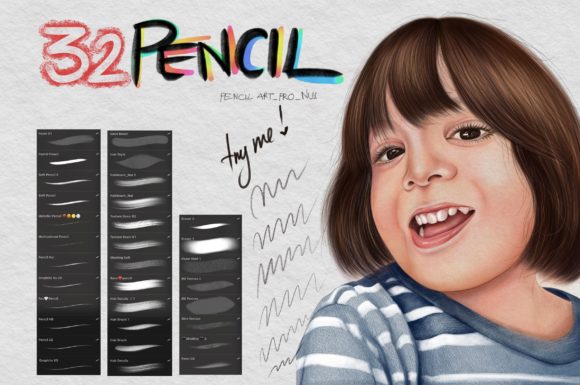
Digital illustration has evolved from a niche hobby into a primary medium for professional artists, designers, and hobbyists alike. At the heart of this creative shift is the ability to mimic traditional media with precision and ease. The Pencil Procreate Brush set serves as a critical tool in this ecosystem, offering a collection of thirty-two distinct brushes designed specifically to replicate the tactile feel of graphite, charcoal, and colored pencils within the digital environment. For anyone looking to elevate their digital sketching or illustration workflow, understanding the nuances of these tools is essential.
This specific brush pack is not a universal asset; it is engineered exclusively for the Procreate application. To utilize these resources effectively, users must meet specific hardware and software requirements. The set requires an iPad (preferably an iPad Pro for optimal performance), an Apple Pencil for pressure sensitivity, and Procreate Version 5.0 or higher. Without these components, the intricate pressure dynamics and texture mapping that define the quality of these brushes cannot be fully realized.
Why Texture Matters in Digital Art
In traditional art, the tooth of the paper and the hardness of the lead determine the character of a drawing. In digital art, these elements are simulated through complex algorithms. A high-quality Pencil Procreate Brush does more than just draw a gray line; it responds to the speed, angle, and pressure of your stylus. This responsiveness creates a natural variance in opacity and grain, preventing the sterile, uniform look that often plagues beginner digital drawings.
The inclusion of thirty-two different variations allows artists to move beyond a single "pencil" tool. Some brushes in the set may offer hard, sharp lines suitable for technical sketches or architectural drafts, while others provide soft, smudged textures ideal for shading and atmospheric depth. This diversity means that an artist can complete an entire piece—from initial thumbnail to final render—without ever switching to a different type of media tool, maintaining a cohesive aesthetic throughout the process.
Perspectives for Different Creators
The value of a specialized brush set varies significantly depending on who is holding the Apple Pencil. What matters to a seasoned illustrator may differ entirely from the priorities of a small business owner creating social media content.
For Beginners and Hobbyists
For those new to digital art, the learning curve can be steep. Many beginners struggle with the lack of friction on the glass screen of an iPad. A well-configured Pencil Procreate Brush can mitigate this by providing visual feedback that feels familiar. If you are used to sketching in a notebook, these brushes bridge the gap between physical and digital. The priority here is ease of use and learning value. Beginners benefit from presets that already have optimal flow and stabilization settings, allowing them to focus on form and composition rather than tweaking technical parameters.
Practical example: A hobbyist journaling their daily life can use the softer pencil variants to create quick, expressive sketches that complement handwritten notes, adding a personal, organic touch to their digital planner.
For Professional Illustrators and Concept Artists
Professionals prioritize speed, reliability, and quality. When working under tight deadlines, such as in concept art for games or editorial illustrations, the ability to iterate quickly is paramount. The thirty-two brushes in this set allow for rapid switching between line work and shading without breaking concentration. Professionals evaluate these tools based on how well they integrate into an existing workflow. Can the brush handle high-resolution canvases without lag? Does it blend well with other layers?
For a concept artist, the harder pencil brushes might be used for clean, precise linework on character designs, while the textured variants could be employed for quick environmental mood boards. The commercial value lies in the efficiency gained; a tool that reduces setup time directly impacts profitability.
For Educators and Content Creators
Educators, bloggers, and marketers often use digital art not for fine art pieces, but for communication. Clarity and engagement are key. A Pencil Procreate Brush set allows educators to create hand-drawn diagrams, annotated slides, or explainer videos that feel more approachable than rigid vector graphics. The human element of a pencil sketch can make complex information feel less intimidating.
Consider a marketing consultant creating a carousel post for LinkedIn. Using a sketch-style brush to highlight key data points or draw simple icons can increase engagement by breaking the monotony of stock photography. Here, the priority is presentation and versatility. The brush set needs to be flexible enough to produce both rough ideas and polished final assets.
For Architects and Designers
While not fine artists, architects and interior designers often use Procreate for client presentations. The ability to overlay hand-drawn sketches on top of photos or 3D renders is a powerful sales tool. The Pencil Procreate Brush set provides the necessary realism to make these overlays look like genuine hand-rendered concepts rather than digital afterthoughts. For this audience, precision and realism are the deciding factors.
Evaluating the Toolset: Key Considerations
Before integrating any new brush set into your workflow, it is helpful to assess how it aligns with your specific goals. Here are several factors to consider when evaluating the Pencil Procreate Brush collection:
- Compatibility: Ensure your device meets the requirements. The brushes rely on Procreate’s engine (Version 5.0+), so older devices or outdated software will not support the advanced features.
- Variety vs. Specialization: With thirty-two brushes, this set offers breadth. Ask yourself if you need a wide range of pencil types or if you prefer mastering a single, versatile tool. This set is ideal for those who enjoy experimenting with different textures.
- Workflow Integration: Consider how these brushes fit with your current palette and layer habits. Pencil brushes often work best on textured paper backgrounds. You may need to adjust your canvas setup to get the most out of the grain effects.
- Learning Curve: While easier than creating custom brushes from scratch, each of the thirty-two options has unique behaviors. Allocate time to test each brush to understand its pressure sensitivity and tilt response.
Maximizing Your Creative Output
To get the most out of your Pencil Procreate Brush set, consider adopting a layered approach. Start with a lighter, harder pencil for your initial construction lines. These brushes typically have lower opacity, making them easy to erase or paint over. As you refine your sketch, switch to a darker, softer pencil variant for defining edges and adding weight. Finally, use the textured, smudge-ready brushes for shading and volume.
It is also worth noting that digital tools are forgiving. Unlike traditional graphite, you can undo mistakes instantly. However, relying too heavily on the undo button can hinder artistic growth. Try to use the brushes in a way that encourages confident strokes. The variety in this set supports this by offering tools that reward deliberate movement with beautiful, natural-looking marks.
For entrepreneurs and small business owners, this efficiency translates to brand consistency. By sticking to a defined set of brushes, your visual content maintains a coherent style across different platforms. Whether you are designing a logo sketch, a product mockup, or an Instagram story, the consistent texture of the pencil brushes reinforces your brand identity.
Final Thoughts on Digital Sketching
The transition to digital art does not require abandoning the aesthetics of traditional media. Tools like the Pencil Procreate Brush set demonstrate that technology can enhance, rather than replace, the organic feel of hand-drawn art. Whether you are a student learning anatomy, a professional illustrator meeting a deadline, or a marketer trying to connect with an audience, the right tools can significantly impact your output.
By understanding the specific requirements—iPad, Apple Pencil, and Procreate 5.0+—and recognizing how different brushes serve different purposes, you can make an informed decision about whether this set fits your creative needs. The thirty-two options provide a robust foundation for exploration, allowing you to find the perfect balance between control and expression. Ultimately, the value of these brushes lies not just in their code, but in how they empower you to bring your ideas to life with clarity, speed, and artistic integrity.