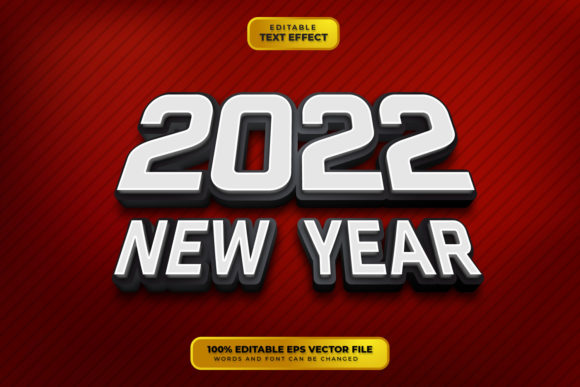
Mastering the Happy New Year 3D Editable Text Effect for Professional Designs
The transition into a new year is one of the most significant moments in graphic design calendars. Whether you are creating social media banners, corporate greeting cards, or large-format event signage, the visual impact of your typography can define the success of your campaign. This is where the Happy New Year 3D Editable Text Effect becomes an invaluable resource. Unlike static images that limit your creative flexibility, this fully editable vector design offers a robust solution for designers who need high-quality, three-dimensional typography without the steep learning curve of manual 3D modeling.
For many creative professionals and small business owners, the pressure to produce polished, eye-catching content quickly is immense. Traditional methods of creating 3D text often require advanced skills in software like Adobe After Effects, Cinema 4D, or complex Photoshop layering techniques. These methods are time-consuming and often result in rasterized images that lose quality when resized. The Happy New Year 3D Editable Text Effect addresses these pain points by providing a pre-built, vector-based structure that is both scalable and customizable. It bridges the gap between professional-grade aesthetics and user-friendly editing, allowing you to focus on the message rather than the mechanics of design.
Understanding the Value of Vector-Based 3D Typography
At its core, this design asset is not merely a font; it is a sophisticated text effect built within Adobe Illustrator. Understanding this distinction is crucial for maximizing its utility. Because it is a vector design, it relies on mathematical paths rather than pixels. This means you can enlarge or reduce the design to any size—from a small Instagram post to a massive billboard—without experiencing any loss in clarity or sharpness. This scalability is essential for maintaining brand consistency across various media platforms.
The term "100% Vector" and "100% Editable" signifies that every element of the 3D effect, including shadows, highlights, and depth, is constructed using editable vector shapes. This allows for precise control over the final appearance. You are not locked into a specific look. If your brand guidelines require a specific shade of gold or a particular angle of shadow, you can adjust these elements directly. The files included typically consist of Adobe Illustrator formats (compatible with version 10 and above), EPS files for broader compatibility, and high-resolution JPGs for quick previews or non-editable uses. This versatility ensures that regardless of your software preference or technical setup, you can integrate this effect into your workflow seamlessly.
Overcoming Common Design Challenges
Designers often face several challenges when tackling holiday-themed projects. One major issue is time management. Creating a realistic 3D effect from scratch can take hours of tweaking lighting, extrusion, and perspective. With the Happy New Year 3D Editable Text Effect, this process is reduced to minutes. The "Click and Type" functionality means that you simply select the text object, input your desired message, and the effect applies automatically. This efficiency is particularly beneficial for agencies handling multiple client campaigns during the busy holiday season.
Another common challenge is typographic limitation. Many pre-made 3D assets are static images, meaning you cannot change the wording without losing the effect. This design solves that problem by being fully editable. While it is important to note that this is not a font file itself, it works in conjunction with any font installed on your system. You can swap out the default typeface for a bold serif, a modern sans-serif, or a playful script, and the 3D structure will adapt to the new letterforms. This flexibility allows you to tailor the mood of the design to suit different audiences, whether formal corporate clients or casual social media followers.
Practical Applications and Use Cases
The applications for this text effect are diverse, catering to various industries and creative needs. Here are several practical ways to implement this asset:
- Social Media Campaigns: Create engaging posts for Instagram, Facebook, and LinkedIn. The vibrant 3D look stands out in crowded feeds, increasing click-through rates and engagement.
- Digital Greeting Cards: Design personalized e-cards for clients and employees. The ability to edit the text allows you to add specific names or messages, adding a personal touch to digital communications.
- Event Signage and Banners: For New Year’s Eve parties or corporate galas, use the vector files to create large-scale prints. The scalability ensures that the text remains crisp and legible from a distance.
- Web Headers and Landing Pages: Incorporate the JPG or exported PNG versions into website headers to create a festive atmosphere for online stores or service providers during the holiday season.
- Promotional Materials: Use the effect in flyers, brochures, and email newsletters to highlight special New Year promotions or sales events.
Each of these applications benefits from the professional finish that 3D typography provides. It adds depth and dimension to flat designs, making them more visually appealing and memorable. By using a pre-made effect, you ensure that the technical aspects of lighting and perspective are handled professionally, allowing you to concentrate on layout and composition.
Customization Tips for Best Results
To get the most out of the Happy New Year 3D Editable Text Effect, consider the following recommendations during the editing process. First, pay attention to font selection. Since the effect adds volume and weight to the letters, thicker fonts often render better in 3D than very thin scripts. However, experimenting with different typefaces can yield unique results, so do not hesitate to test various options.
Second, utilize the color customization features. While the default design may come with a specific color scheme, you can easily change the fill colors of the vector shapes to match your brand identity. Use the Eyedropper tool in Adobe Illustrator to sample colors from your logo or existing marketing materials to ensure cohesion. Additionally, you can adjust the gradient meshes or solid fills to simulate different materials, such as metallic gold, silver, or matte finishes.
Finally, remember that this is a design template, not a font installer. You must have the fonts used in the design installed on your computer, or you can substitute them with any other font you prefer. This openness allows for endless creativity. If you are unfamiliar with Adobe Illustrator, start by exploring the layers panel. The design is organized logically, making it easy to isolate specific parts of the text effect for modification. Simple adjustments to size, position, and color can transform the look entirely, making it feel bespoke and original.
Tailoring the Approach for Different Users
Different users will approach this tool with varying levels of expertise and distinct goals. For novice designers, the primary benefit is ease of use. The "Just Click and Edit" nature of the file removes the intimidation factor associated with complex graphic design software. They can achieve professional results without extensive training, boosting confidence and productivity.
For experienced graphic designers, the value lies in efficiency and customization. They can use the base structure as a starting point, deconstructing the vector paths to create entirely new variations. They might adjust the perspective, add additional lighting effects, or combine the text with other vector elements to create complex compositions. For marketing managers and business owners, the focus is on speed and brand alignment. They need assets that can be deployed quickly across multiple channels while maintaining a high standard of quality. This editable text effect serves as a reliable tool that meets these diverse needs, offering a balance between simplicity and professional capability.
In conclusion, the Happy New Year 3D Editable Text Effect is more than just a decorative element; it is a strategic design asset. It empowers creators to produce high-impact, scalable, and customizable typography with minimal effort. By leveraging the power of vector graphics and the flexibility of Adobe Illustrator, you can elevate your New Year’s designs, ensuring they resonate with your audience and reflect the professionalism of your brand. Whether you are crafting a simple social media post or a large-scale print campaign, this tool provides the foundation for stunning visual communication.